
Chapter 5: The Checkout Process
As we saw in Chapter 4, the ALANA Platform has its own hosted checkout system available to all of its partners and members. And it's easily accessible through the SDK.
Payment processing
The ALANA Platform uses Stripe for its payment processing and checkout handling.
Checking out
Rather than a single "checkout" resource object, the ALANA SDK handles checkouts by methods on existing objects. Memberships, for example, have a checkout() method. So do experiences, products, and anything you can buy on the ALANA Platform with real money.
Every checkout method requires at least two parameters, a pair of URLs that the user will be redirected to after successfully completing or cancelling the checkout process. We saw that in the last chapter, but it's a pattern repeated throughout the SDK. Some resources need additional data when checking out, and that will always be passed to checkout() in a configuration object before the redirect URLs.
An Experience checkout
To demonstrate, we'll finally wire up the "Buy" buttons on Bianca's experiences. She'll be thrilled, surely. Create buy.html as follows:
<!DOCTYPE html>
<html lang="en">
<head>
    <meta charset="UTF-8">
    <meta name="viewport" content="width=device-width, initial-scale=1.0">
    <title>Alana Platform SDK test</title>

    <script type="module">
    import { getExperience, createExperienceCheckout, useAccessTokens } from "/site.js";

    useAccessTokens();
    let params = new URLSearchParams(document.location.search);

    // If there was no "experience" query parameter, redirect to the experience list.
    const experienceId = params.get("experience")
    if (experienceId != null) {
        await getExperience(experienceId);
    } else {
        location.href = "/experiences";
    }

    document.querySelector("#experience-buy-form").addEventListener("submit", async (event ) => {
        event.preventDefault();
        const checkout = await createExperienceCheckout(experienceId);
        if (checkout && checkout.url) {
            location.href = checkout.url;
        } else {
            location.href = "/experiences";
        }
    })
    </script>

    <style>
    .hidden {
        display: none;
    }
    </style>
</head>
<body>
    <header>
        <h1>Experiences by Inner Light Wellness</h1>
    </header>

    <main>
        <div id="experiences-list">
        </div>
        <div id="experience-buy-section">
            <form id="experience-buy-form" method="get" action="">
                <div class="form-row">
                    <label for="experience-form-date">Select a date</label>
                    <input type="date" name="date" id="experience-form-date" required />
                </div>

                <div class="form-row">
                    <label for="experience-form-guests">Number of guests</label>
                    <select name="guests" id="experience-form-guests" required>
                        <option value="1">1</option>
                        <option value="2">2</option>
                        <option value="3">3</option>
                        <option value="4">4</option>
                    </select>
                </div>

                <div class="form-row form-buttons">
                    <button type="submit" id="experience-buy-submit">Buy This Experience</button>
                </div>
            </form>
        </div>
        <div id="experiences-error" class="hidden">
            <p>The experience you requested doesn't exist. Please try again.</p>
            <a href="/experiences">Back to Experiences List</a>
        </div>
    </main>

    <footer>
        <p>Powered by <a href="https://alana4.com">ALANA4 and the ALANA SDK</a></p>
    </footer>

    <template id="experience-card">
    <section>
        <h1 class="experience-card-title"></h1>
        <p class="experience-card-description"></p>
        <div>
            <span class="experience-card-price"></span>
            <div>
            <button type="button" class="experience-card-see-more hidden">See More</button>
            <button type="button" class="experience-card-buy hidden">Get This Experience</button>
            </div>
        </div>
    </section>
    </template>
</body>
</html>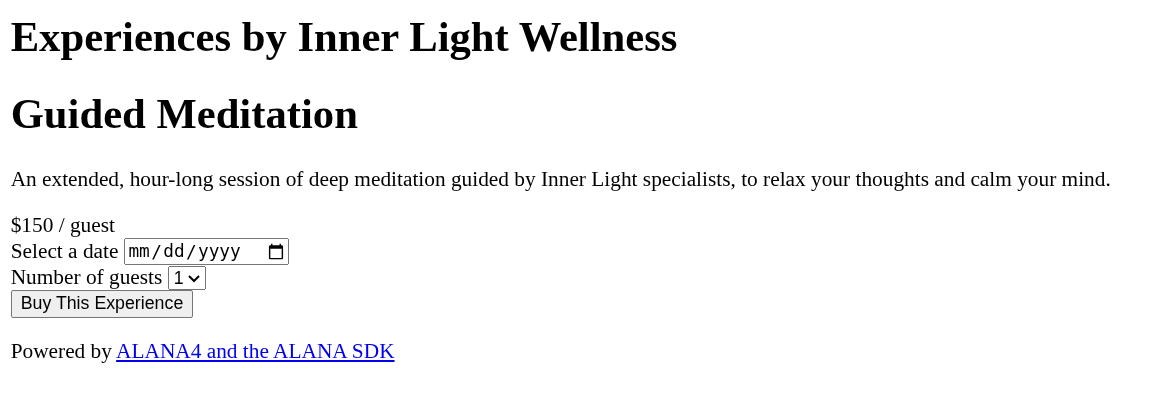
For an experience, we need a little extra information before we can really sell it. They're activities, after all, and they occur at a specific time and place. So here we've created a simple form to choose a date and how many tickets the user wants to purchase.
Tickets
Tickets are an actual resource object, too. We won't get into them in this tutorial, but the ALANA SDK has a simple yet flexible system for handling event tickets.
When the user submits this form, we detect that through the event listener on lines 22-30. It calls a new helper function, createExperienceCheckout(), so we'll need to add that to site.js:
export async function createExperienceCheckout(experienceId) {
const form = document.querySelector("#experience-buy-form");
try {
const formData = new FormData(form);
const experience = await Api.Experiences.get(experienceId);
const successUrl = new URL(location.origin);
const cancelUrl = new URL(location.href);
const checkout = await experience.checkout({
date: new Date(Date.parse(formData.get("date"))),
guests: formData.get("guests"),
}, successUrl, cancelUrl);
The key portion is highlighted. We call the checkout() method of the experience that the user is purchasing, and we pass it an object containing a couple of data fields. date is the date (and time) the user wants to attend the experience. guests is how many people are attending or, if you prefer, the number of tickets the user is buying.
We also add in the success and cancel URLs. These always come last, in that order.
All ALANA checkout methods return an object with two properties: url and session_id. You'll use the url field as the target of a redirect to send the user to the hosted checkout page. session_id is an opaque string intended for advanced use cases, debugging, and anywhere you might need to look up the specifics of a checkout session.
Back in buy.html, we get the checkout result and use its url to redirect. The rest is out of our hands until the user completes the checkout form and gets sent back to the experiences list...or gives up and backs out to the "buy" page.
Next steps
If the user did finish checking out, tickets will be issued, Bianca will get a notification, and Inner Light Wellness will be credited with an appropriate number of ALANA Rewards. And that means it's time to discuss the ALANA Platform economy.